
Mobile conversation threads just got a glow up. You’ll have the same functionality you’re used to, but with a cleaner design that’s better for focused work.

Supporting customers on the go keeps getting easier.
Be the first to know what's new so you can save more time and delight more customers.
Mobile conversation threads just got a glow up. You’ll have the same functionality you’re used to, but with a cleaner design that’s better for focused work.

Every month, we round up the improvements and fixes that make Help Scout smoother, faster, and more reliable for your team. Here’s what shipped recently.
Improvements for your team
Updates that reduce friction and help your team do their best work.
User availability for smarter routing See who’s available right from assignment and @mention menus, so conversations go to the right teammate at the right time.
AI Drafts now work on converted chats Generate AI Draft replies using chat transcripts as soon as a chat becomes a conversation.
Exclude email domains in rules Fine-tune rules by excluding entire email domains, not just individual addresses. Create Linear issues faster Assign a Linear issue to a project directly from the sidebar, no extra clicks required.
Long email signatures now collapse in mobile Large signatures are collapsed by default on mobile, keeping the message content easy to read.
Phone notes now show customer context on mobile When logging phone notes on mobile, you’ll see the associated customer right in the conversation.
Improvements for developers
Conversation counts added to customer exports and APIs Customer exports and the Customer API now include conversation counts, making it easier to analyze customer activity without manual aggregation.
More reliable workflow processing
Improved isolation for long-running workflow processing
Cleaner, more focused monitoring for queued workflows
Smarter handling of queued workflows after outages
---
Bug fixes
Thanks to your feedback, we squashed a handful of pesky bugs.
Drafts folder counts now update without needing a page refresh
Sending unedited drafts no longer shows confusing error messages
Saved Replies in chat now respect paragraph spacing
Snooze and Send Later work correctly for companies on legacy plans
AI Draft edit indicators now display accurately on mobile
Thanks for catching up with us. These focused updates add up, and we’ve already got more in the works for next month.
Welcome to our first monthly roundup. Every month, we’ll highlight the improvements and steady updates that make Help Scout even better to use.
---
Updates that reduce friction and help your team do their best work.
Copy thread URL
Need to bring someone into a conversation? Grab a direct link to any thread and share it instantly.
New permission for auto replies
Let teammates update your autoreply without granting full admin access.
Improvements to processing time for Workflows
Workflows just got way faster. Workflows that sometimes took 3 or more days to process now take just 5 minutes.
Import emails from Outlook
Skip the copy-and-paste slog. Bring your Outlook history into Help Scout in a few clicks, keeping all past conversations in one place.
Sort companies by Last Seen
Quickly spot your most recently active accounts with a new “Last Seen” sorting option.
Mobile: Adding notes just got smoother
Your conversation list now refreshes right after you add a note, so you’re always up to date.
Conversation dock is now available on iPad
Use the conversation dock to easily juggle conversations across devices.
A new way to fine-tune your Views
Create more focused Views by filtering out entire customer domains — not just individual addresses.
---
Enhancements that make building on Help Scout more powerful and reliable.
API support for company management
You can now manage organizations at scale with new endpoints for listing, creating, updating, and retrieving organizations. Take a look at the full set of endpoints.
New organization webhooks
Stay up to date with webhooks that instantly notify you when an organization is created or updated.
Webhooks for AI Answers
Get real-time visibility into AI Answers with new webhooks that track responses, so you can measure impact or trigger custom workflows.
---
Thanks to your feedback, we squashed a handful of pesky bugs.
Generated PDF invoices render correctly again
Folder counts display the right totals
The “number” filter in search now works as expected
On mobile, tables render properly inside messages
Thanks for catching up with us. These focused updates add up, and we’ve already got more in the works for next month.
Stay in the loop, wherever you are. The Notification Station is now available on mobile, giving you a streamlined view of what needs your attention—right from your phone. Whether you’re on the go or just away from your desk, it’s easier than ever to stay caught up.
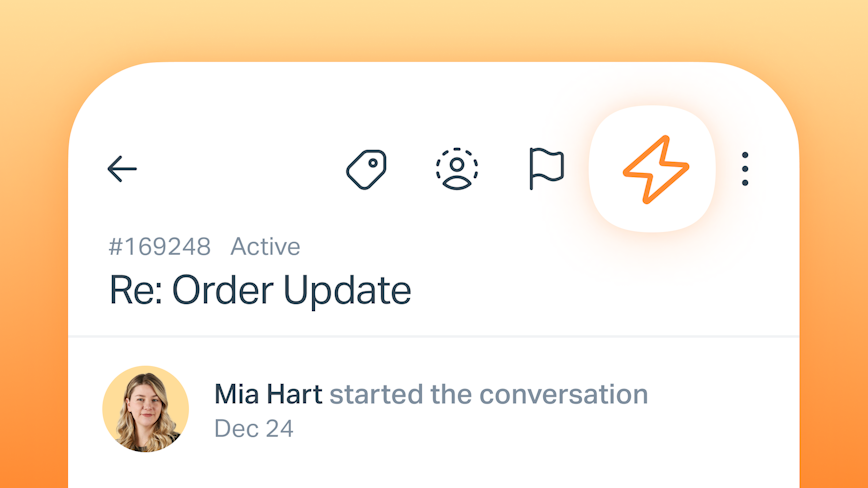
Taking action on the go has never been easier! You can now run manual workflows on conversations from the app, enabling you to take multiple actions in just two taps. Tap the bolt icon in any conversation to view and select the workflow you want to run. Did you know? You can leverage the power of AI Drafts on the go. Simply create a Manual Workflow that includes the `Generate an AI Draft` action. When working from the mobile app, run the workflow on a conversation to create AI Drafts where helpful.
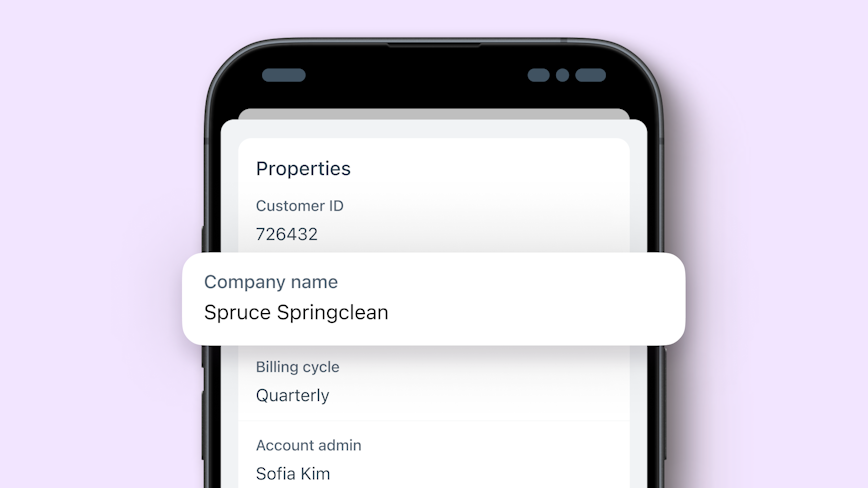
You can now access Customer Properties right from the customer profile while on the go! Just tap the customer’s avatar in any conversation to view their profile including details like email, phone number, past interactions—and now properties. Stay connected and informed, no matter where you are. Read more about customer properties here.





